Employee monitoring software that shows where the hours go
See which websites and apps each person uses and for how long, with screenshots and active and idle time. Works on company Windows PCs in the office or at home.
“We were just working on a hunch that we had a problem, but we had to be sure”
“This software is so effective, we’ve been using it for over a decade!”
Used in 150+ countries · Made by Deep Software Inc. in Canada
Manufacturing · Retail · Financial services · Accounting · Legal · Insurance · Healthcare · IT & MSPs · Government
Sound familiar?
You trust your team. You also have questions you can’t answer from your desk.
Screens change when you walk by
You suspect hours go to video, shopping or social media, but you have no proof.
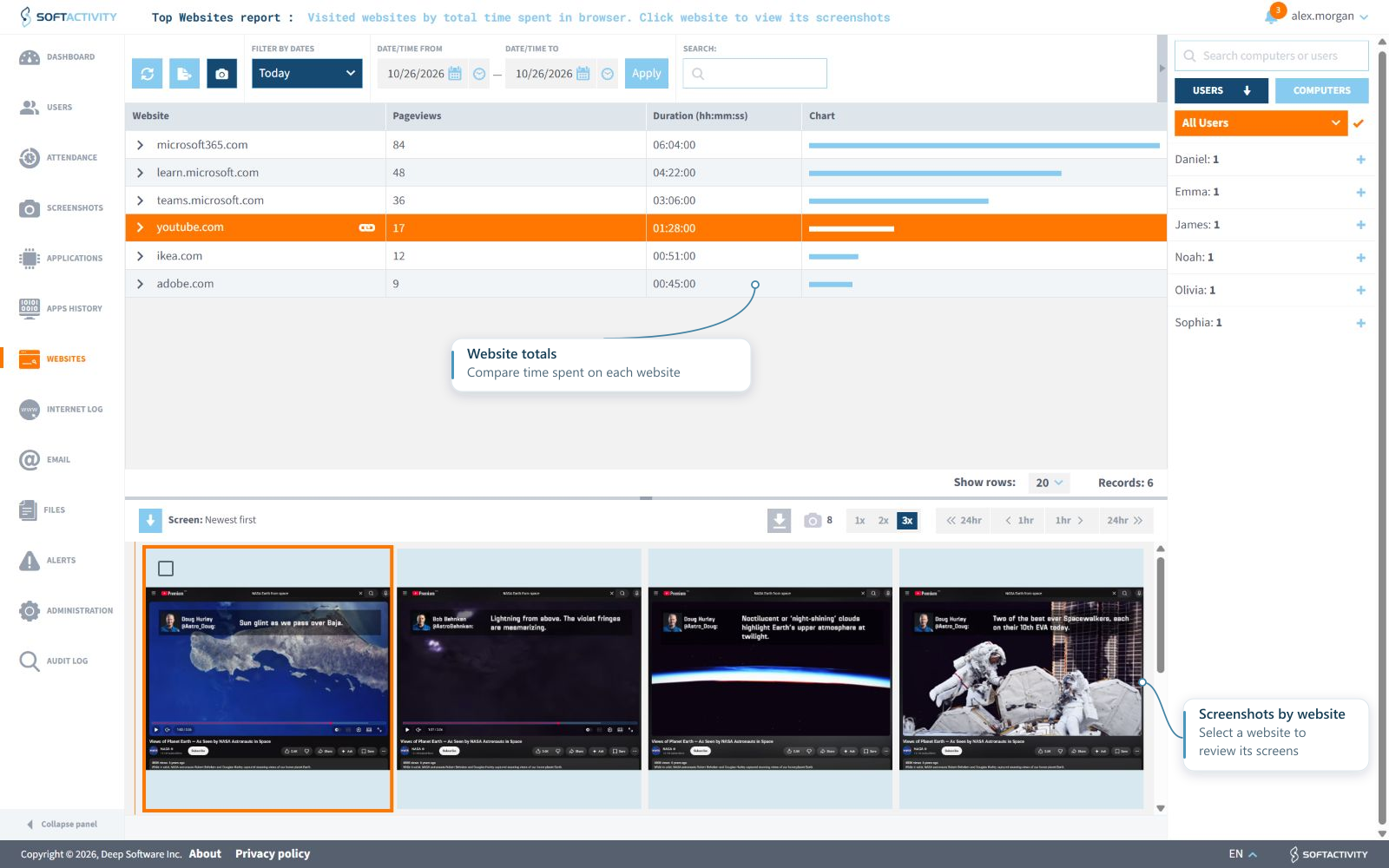
Websites and apps are timed per person, with screenshots, so you can see where the hours went.
Half the team works from home
A green online dot only means the laptop is on. From a distance, an 8-hour day and a 4-hour day look the same.
SoftActivity records active and idle time, logon and logoff, for every person, every day.
Client data on every laptop
Confidential files now sit on computers you rarely see, far from your IT team. When something goes wrong, you find out late.
Screenshots and the activity history help you spot insider threats and investigate them. The on-premise version also emails you alerts.
A complaint you have to look into
Someone reports that a colleague misuses a company computer, and you need facts before you act.
Review the screenshots, websites and apps from that computer, so HR can decide on facts.
Prefer the cloud? Start a cloud trial
Four questions you can answer by Friday
Once SoftActivity is on a PC, its reports start filling in the same day.
Where do the hours go?
Top Websites and Top Programs reports rank time per person, with active and idle time split out.
Who visited a site on your list?
Add the websites and keywords you care about. The on-premise version emails you an alert when someone visits a site on your list or a listed keyword comes up.
What happened, step by step?
Logon-to-logoff timelines with screenshots give HR or an investigation a step-by-step record. Export them to PDF or Excel.
Who is working on what now?
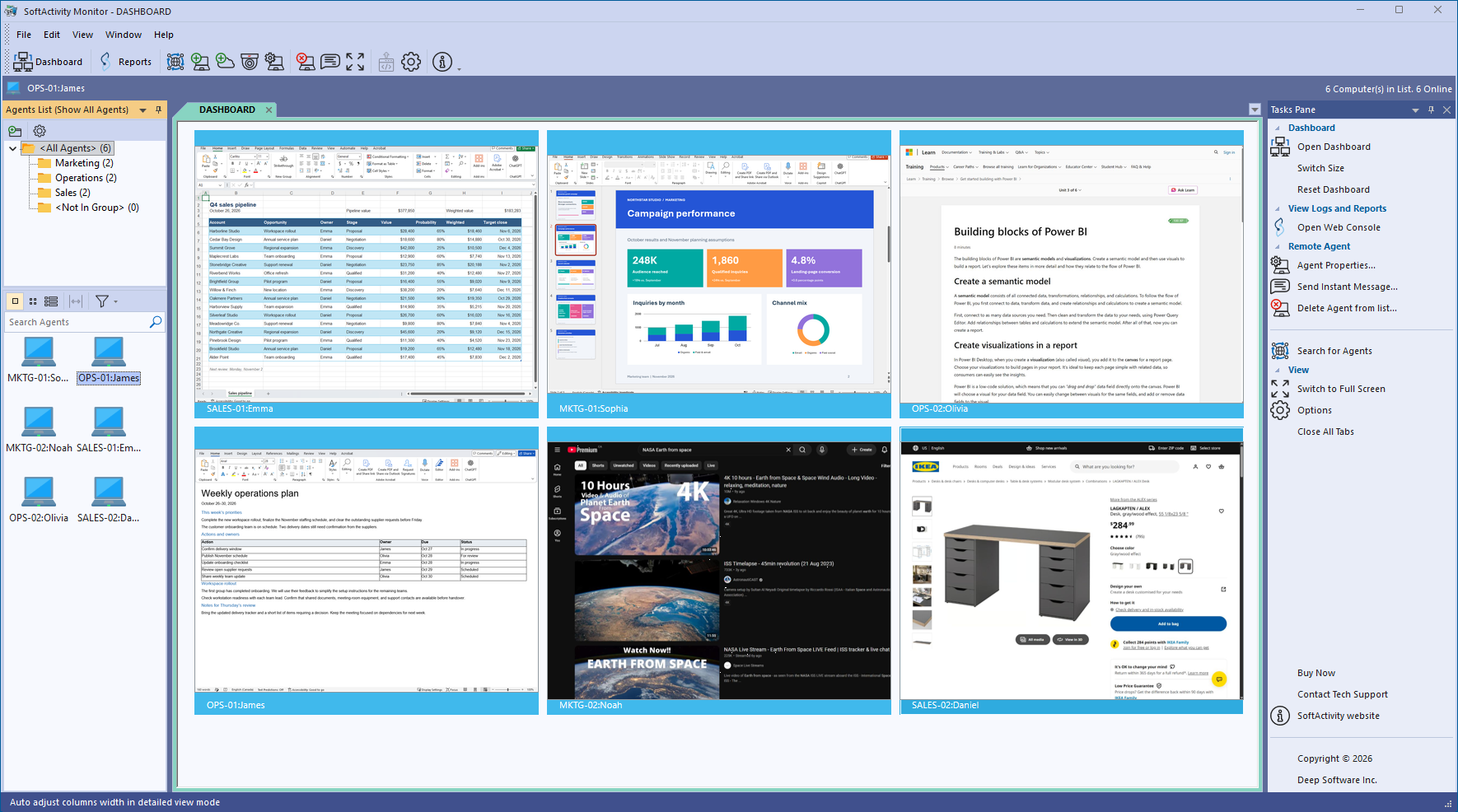
Live view shows several screens at once, so you can check on a team without walking the floor.
Run it on your server or in the cloud
Choose by where you want the activity data to live and how you’d rather pay. Buy now, or try either one free for 7 days.
SoftActivity Monitor
Starts at $270 USD for a 3-computer license, paid once
Click Buy now to see volume discounts for more computers.
- Activity logs stay on your own server
- Pay once and keep it, with 1 year of updates and support
- Off-site company PCs report in without a VPN
- Live view of several screens at once
Trial: 7 days · up to 2 computers · no credit card
SoftActivity Work
Starts at $50 USD a month for 5 users, billed yearly
Click Start my cloud trial to see volume discounts for more users.
- No server for you to buy or maintain
- PCs in the office or at home report in over the internet
- Reports in any web browser, with optional Microsoft sign-in
- Data encrypted in transfer and in storage
7 days · card not charged before the trial ends
Running RDS or Citrix servers? Our RDS edition records each user session on the server. Starts at $650 USD for one server, paid once.
Privacy and your data
On-premise: your own serverData from computers on your network stays inside your network, on your own server. You can keep it on an encrypted drive.
Cloud: hosted on Microsoft AzureData is stored in a Microsoft Azure data center in the United States, encrypted in transfer and in storage. You can export all your data anytime.
Your data belongs to youSoftActivity doesn’t sell or share your data, and has no access to on-premise data. Only the team members you choose can see it.
Read our Privacy Policy, and the Data Processing Agreement for customers in the EU and UK.
See where the day really goes
SoftActivity times websites and apps per person, including Incognito windows, and keeps the record even if someone clears their browser history. The report lands in your inbox daily, weekly or monthly.
“From the first minute we installed Activity Monitor, we cut out half the time I was spending monitoring people manually.”
Questions managers and IT ask us
“It was pretty easy to use – and when I did have a few questions early on, their online technical support was able to give me the answers I needed.”
Is it legal to monitor employees?
SoftActivity is for computers owned by companies and organizations. You must be the owner or authorized by the owner, and users should know about the monitoring, for example through your computer use policy. Rules differ by country, so check what applies where you operate.
Will employees see the software?
You decide, within your policy. SoftActivity can run in visible mode, so people see that monitoring is on, or hidden on company-owned computers when users have agreed to monitoring through your company policy or other acceptable means.
Can I monitor employees working from home?
Yes, on company-owned computers, wherever they are. Both the on-premise and cloud versions keep working when laptops are away from the office network.
Will it slow down our computers?
No. SoftActivity is built by a team that has specialized in monitoring software for over 20 years. Our experienced engineers designed and optimized it to use minimal CPU, memory and battery. It uses only about 125 MB of RAM on a computer. Your team won’t notice it. See for yourself in the free trial.
Can I install it remotely?
Yes. With the on-premise version, install it on domain computers over the network from the console. It runs in the background and needs no restart. To cover many PCs at once, roll it out with Active Directory Group Policy. With the cloud version, push the small client app with Intune, Group Policy or your usual software-deployment tool.
Do I need a credit card for the free trial?
Not for the on-premise trial. Download it and use it free for 7 days. The cloud trial asks for a card at signup, and the card is not charged before the 7-day trial ends.
What does the on-premise trial include?
7 days on up to 2 computers, in visible mode, with blurred screenshots.
On-premise or cloud: which should I pick?
Pick on-premise if you want activity logs on your own server and a one-time license. Pick cloud if you would rather not run a server and want reports from anywhere. For RDS or Citrix servers, use the RDS edition. Compare on-premise and cloud side by side.
Read your first reports this week
Install the on-premise trial on the 2 company computers you have the most questions about and read the reports for 7 days. The trial runs in visible mode, so your team can see that monitoring is on.
Download free 7-day trialPrefer the cloud? Start a cloud trial